Set Up CalDAV Connection in Apple iCal
To add the mail.de calendar in Apple iCal, follow these steps:
-
Click "iCal / Preferences / Accounts".
-
Click the "+" to add a new CalDAV account.
-
Enter the following information:
Select "CalDAV" from the dropdown menu
Username: your mail.de username/login
Password: your mail.de password
Server Address: https://kalender.mail.de/principals/mustermann@mail.de

-
Click "Create".
-
Your mail.de calendar will now appear in Apple iCal and is ready to use.
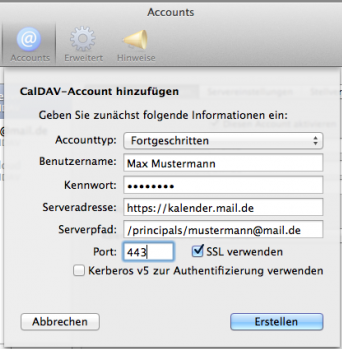
OS X 10.9 Maverick
For Mavericks, enter the following information in step 3:
Account Type: Advanced
Username: your mail.de username/login
Password: your mail.de password
Server Address: https://kalender.mail.de
Server Path: /principals/mustermann@mail.de (replace mustermann@mail.de with your mail.de address)
Port: 443
SSL: check the box