Set Up CalDAV Connection in iPhone/iPad Calendar
To add the mail.de calendar in Apple's iCal on iPhone or iPad, follow these steps:
-
Go to "Settings / Mail", "Contacts", "Calendars / Add Account".
-
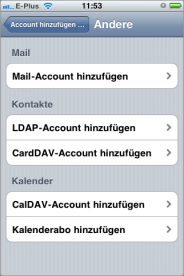
In the list, select "Other".
-
Under Calendars, tap "Add CalDAV Account".
-
Enter the following information:
Server: https://kalender.mail.de/principals/mustermann@mail.de
Username: your mail.de username/login
Password: your mail.de password
Description: Any name you like (e.g., mail.de Calendar)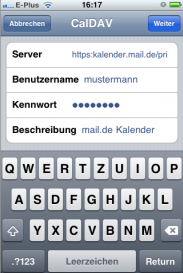
-
Tap "Next".
-
The connection will be verified and your calendar will appear under "Accounts".
-
Open the Calendar app and select which calendars you want to display. Choose your mail.de calendar and tap "Done".
-
All events from this calendar will now be displayed.

